> For the complete documentation index, see [llms.txt](https://yvechat.gitbook.io/wp/llms.txt). Markdown versions of documentation pages are available by appending `.md` to page URLs; this page is available as [Markdown](https://yvechat.gitbook.io/wp/architecture/engine.md).
# YveChat Engine
The component that makes local custody work
The Engine is a small component that runs on the user's machine and holds everything that matters. An unsigned public developer-preview archive is available through GitHub Releases with a published checksum. Signed and notarized installers remain Planned.
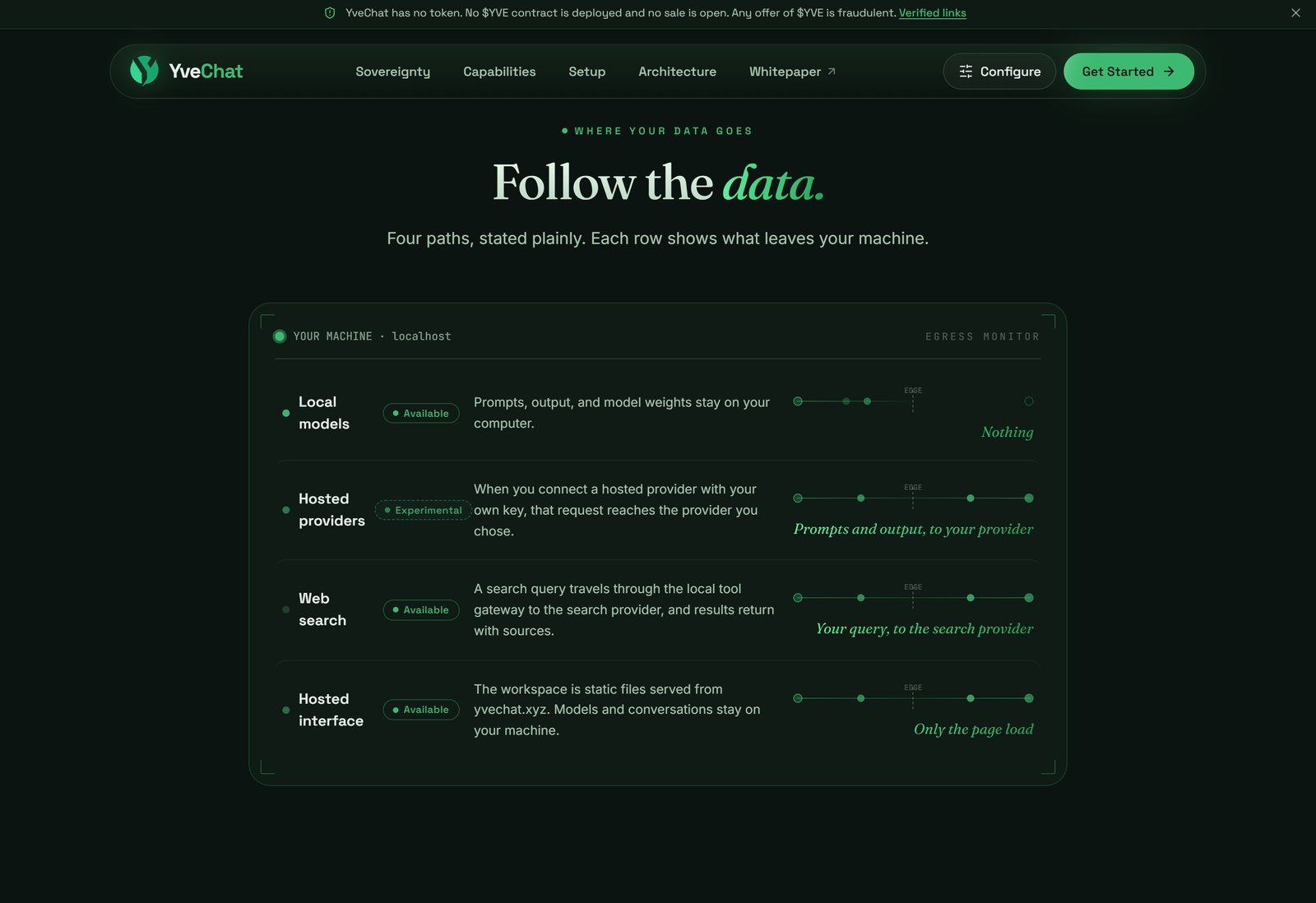
Each path, and what leaves the machine on it
***
### Why It Is Necessary
A hosted page cannot reliably and safely enumerate local model servers across every browser. Three independent constraints establish this, each documented by the party responsible.
#### 1) Ollama rejects the hosted origin by default
Ollama accepts cross-origin requests from `127.0.0.1` and `0.0.0.0` only, unless the user sets the `OLLAMA_ORIGINS` environment variable. Adding a hosted origin means editing a systemd unit, a launchd plist, or a Windows environment variable, then restarting the daemon.
Source: [Ollama FAQ](https://docs.ollama.com/faq)
#### 2) Chrome gates local network access behind a permission prompt
Chrome restricts requests from public sites to loopback and private ranges, surfacing a permission prompt reading "Look for and connect to any device on your local network". The restriction shipped in Chrome 142, split into separate `local-network` and `loopback-network` permissions in 145, and extended to WebSocket and WebTransport connections in 147.
Sources: [Chrome Local Network Access](https://developer.chrome.com/blog/local-network-access), [Chrome Platform Status](https://chromestatus.com/feature/5152728072060928)
#### 3) Safari's loopback behavior has been inconsistent
WebKit's bug covering loopback mixed content has been open since 2017. Safari 18 shipped a regression that blocked an HTTPS page from loading `http://127.0.0.1`, fixed in March 2025.
Sources: [WebKit 171934](https://bugs.webkit.org/show_bug.cgi?id=171934), [WebKit 279249](https://bugs.webkit.org/show_bug.cgi?id=279249)
Measured against the deployed origin on 8 August 2026, with an Engine running and answering: Chromium reaches it once the local-network permission is granted, Firefox reaches it directly, and WebKit does not reach it at all. The measurement used the WebKit build shipped with Playwright. Its result establishes the Engine's behaviour under that build. Safari on macOS remains a separate verification target. YveChat therefore treats Safari as unverified and points those visitors at the Engine's own address, which is same-origin and unrestricted in every browser.
{% hint style="info" %}
The specifications favor this design. W3C Secure Contexts classifies loopback addresses as potentially trustworthy, and Mixed Content permits an HTTPS page to request them. Browser implementations vary, and the Engine absorbs that variance.
{% endhint %}
***
### What It Does
| Responsibility | Detail |
| ----------------------------- | --------------------------------------------------------------------------- |
| **Detect runtimes** | Enumerate installed runtimes and available models |
| **Normalize providers** | Present Ollama, vLLM, and hosted APIs through one internal contract |
| **Hold secrets** | Keep tool credentials and settings inside the Engine process on the machine |
| **Pair with the origin** | Bind explicitly to `app.yvechat.xyz`, rejecting all others |
| **Keep data local** | Prompts, images, and output stay on the machine |
| **Absorb browser variance** | Handle permission and compatibility differences per browser |
| **Serve a fallback** | Present a local interface when hosted-to-local access is blocked |
| **Execute approved commands** | Run confirmed operations such as a model pull, reporting progress |
***
### Pairing
```mermaid
sequenceDiagram
participant U as You
participant W as Workspace
participant B as YveChat Engine
U->>B: Install and start
W->>B: Request pairing
B->>U: Display a pairing code
U->>W: Enter the code
W->>B: Establish origin-restricted session
B-->>W: Runtimes and models
```
Pairing is explicit and origin-restricted. The Engine answers to `https://app.yvechat.xyz` alone, and a user-visible step establishes that relationship. A pairing request from any other origin is refused. Canonical origins are listed on [Verified Links](/wp/res/verified-links.md).
The observable properties of a pairing:
| Property | Behavior |
| ---------------- | ------------------------------------------------------------------- |
| Code format | Six digits, generated from cryptographically random bytes |
| Request lifetime | Five minutes. An unused code expires and a new one is requested |
| Token lifetime | Eight hours. Re-pairing is a routine event |
| Storage at rest | Codes and tokens are stored as SHA-256 hashes, never in plain form |
| Origin binding | A token authenticates for its approved origin alone |
| Revocation | Any paired origin can be revoked, which ends its access immediately |
| Rate limiting | Pairing requests are throttled per origin |
| Allowed origins | Configured as exact origins. Wildcards are refused |
The eight-hour token lifetime is worth planning around. Pairing again is the same short flow described in [Pair Your Browser](/wp/getting-started/pair-your-browser.md).
***
### The Cost
Using YveChat with local models requires downloading and running YveChat Engine. The website provides the Engine download path, and the hosted workspace pairs with it after launch. A pure browser page cannot deliver the same reliable local-runtime access.
That is a genuine cost, and it narrows the audience to people willing to run software on their own machine. The position taken in [Proposition](/wp/proposition.md) accepts that trade deliberately.
Local models run entirely through this component today. Hosted-provider support is Planned, and it will reach providers through the same component, using credentials that stay on the machine.
***
Browsers made local access complicated.
The Engine makes it dependable.
---
# Agent Instructions
This documentation is published with GitBook. GitBook is the documentation platform designed so that both humans and AI agents can read, navigate, and reason over technical content effectively. Learn more at gitbook.com.
## Querying This Documentation
If you need additional information that is not directly available in this page, you can query the documentation by asking a question.
Perform an HTTP GET request on the following URL with the `ask` and `goal` query parameters:
```
GET https://yvechat.gitbook.io/wp/architecture/engine.md?ask=&goal=
```
`ask` is the immediate question: it should be specific, self-contained, and written in natural language.
`goal` is what the user is ultimately trying to achieve, the reason they need the answer. Sharing it helps GitBook give you a better, more relevant answer. A goal is most helpful when it describes the outcome the user wants rather than restating the question. For example, with `ask=how do I create an API token`, a goal like `automate deployments from our CI pipeline` lets GitBook tailor the answer to that use case.
The response will contain a direct answer to the question and relevant excerpts and sources from the documentation.
Use this mechanism when the answer is not explicitly present in the current page, you need clarification or additional context, or you want to retrieve related documentation sections.